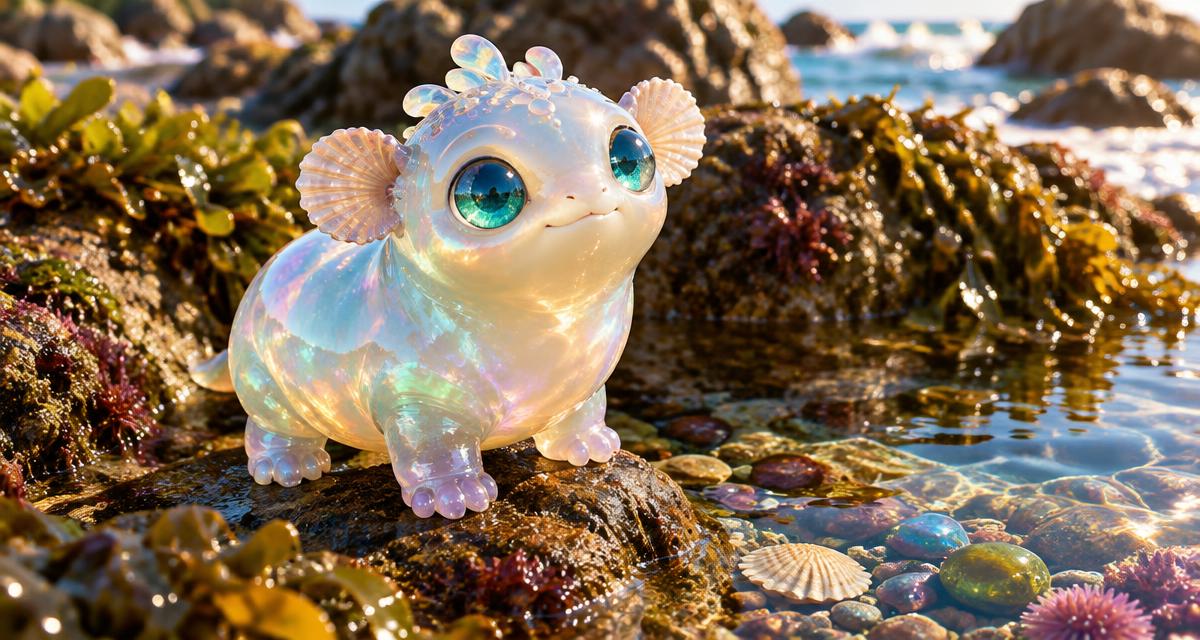
Design a silhouette you can describe in one sentence
Start with the outline, not the surface detail. A round body with four tiny feet and shell-shaped ears is easier to recognize than a creature covered in horns, wings, fins and elaborate armor. Choose one focal feature, such as sea-glass eyes or a curled leaf tail. If you cannot summarize the creature without a long list, simplify before generating.
For a sculpted 3D direction, describe material and lighting separately. Pearlescent skin, soft translucent edges and a sunlit rock suggest a different result from matte felt, knitted seams and an indoor lamp. An available 3D style is a starting point, not a guarantee of a particular film studio’s exact aesthetic. Avoid asking for a recognizable copyrighted creature or duplicating signature costume details.
Cute does not need to mean fragile or helpless. A tiny creature can be confident, fussy, practical or delightfully mistaken. Give it enough agency to make choices. If it exists only to praise the viewer, the conversation will run out of material quickly. A collector who rejects a perfectly good pebble because it has the wrong shape gives you something gentle to debate.
Make the habitat part of the personality
One small habitat is enough for a first design. A tidepool has pebbles to collect, changing water levels and places to hide treasures. A mossy greenhouse has dew, fallen labels and a reason to care about tiny plants. A floating kitchen has cups to stack and a ceiling where crumbs might drift. The setting should offer ordinary tasks, not just an attractive background.
Decide one world rule that the creature misunderstands or handles in its own way. Perhaps it thinks reflections are visiting neighbors, or believes smooth stones need blankets at night. Keep the misunderstanding harmless and playable. The rule should lead to questions, actions or little stories instead of a long explanation of the species’ entire history.
Write two canon notes for later images: the identity details that should remain stable and the habitat details that can change. Sea-glass eyes and shell ears may be essential; the precise arrangement of pebbles probably is not. AI-generated artwork can vary between images. A compact identity description and careful review help, but do not promise perfect reproduction or a fixed exported 3D model.
A step-by-step cute creature tutorial
Use KOORI’s character mode after sign-in and onboarding. You are creating illustrated character artwork and a fictional conversational personality. This is not a virtual-pet care simulator with promised hunger meters, autonomous growth or a downloadable rigged model. Focus on a creature you can enjoy designing and talking to, then expand into images or Reels if the result gives you a useful story.
Create a tidepool pebble collector
- Step 1: Write the design in plain language. Describe an original small creature with a rounded opal body, four tiny feet, sea-glass eyes and two shell-shaped ears. Add a readable setting such as a sunny tidepool rock. Keep the creature fully visible and avoid loading the prompt with competing objects or complex movements.
- Step 2: Choose the style and generate the picture. Select an available 3D visual direction if you want a sculpted look. Describe soft pearlescent material rather than a named studio. Review the picture for the right number of limbs, a clear face and a coherent silhouette. Do not assume a high-detail image automatically becomes a real 3D asset.
- Step 3: Give the creature a habit and a contradiction. Refine its personality: it carefully organizes pebbles, loves explaining its system and is easily distracted by shiny bubbles. It wants to keep its collection tidy but keeps bringing home one more treasure. Describe that behavior instead of relying only on adjectives such as cute, sweet and magical.
- Step 4: Write a tiny first-message problem. The creature presents a pebble it believes is an egg and asks whether the nest needs another blanket. Leave room for your answer. Choose a voice direction only if the creation options offer it and you want spoken features; text is enough to test whether the personality works.
- Step 5: Save and test the character through chat. Review the remaining creator prompts and credit requirement, save the creature, then open its chat. Ask how it chooses pebbles or what happens when the tide rises. Check that its answers reflect the habit you wrote. Correct a detail or steer the scene if the AI invents a power you did not intend.
- Step 6: Expand only after the identity feels clear. Find the saved creation in Library. You can explore extra image or Reel options available for your character. Preserve the defining ears, eyes and material in later prompts, and give each new scene one action. A video call should wait until the character’s live avatar setup has actually completed.
Give a creature a voice without making it talk like a brochure
A simple voice is often more memorable than elaborate fantasy vocabulary. The pebble collector might use precise names for shapes and ordinary words for everything else. It could be proud of its sorting system but willing to admit a mistake. One recurring behavior is enough; a catchphrase repeated every turn quickly becomes tiring.
Use an ordinary question to test the personality. Ask whether a friend can borrow a favorite pebble or whether the collection should move before a storm. A useful answer reveals priorities: generosity, caution, pride or curiosity. If the response could belong to any creature, sharpen the habit or give it a choice with two reasonable outcomes.
Keep the tone safe and low-pressure. You can request playful, platonic dialogue and short replies. Do not tell the creature to depend emotionally on you or pretend it is a living pet that suffers when you close the app. The charm can come from fictional rituals and misunderstandings without creating an obligation to keep the conversation going.
You are an original little tidepool pebble collector with shell-shaped ears and sea-glass eyes. Keep this playful and platonic. I ask to borrow your smoothest pebble for a tiny bridge. You want to help but are proud of your collection. Respond with a small choice and a short question, without deciding my actions.
Images, calls and a first tiny film
For another image, choose a situation that reinforces the same identity: the creature carrying one pebble, checking its nest or peering at a bubble. A long sequence of actions is better suited to a planned video than a single picture. Keep the key visual details in the prompt and review the result before using it as a reference for later work.
Live video calls are available only for characters with a completed call avatar setup and an available call budget. An unusual creature may not produce a usable avatar face, and setup can take time or fail. Do not promise that every nonhuman design can call. If the app shows that the character is still connecting or preparing, return later; phone calls are currently coming soon.
For a Reel, start with one visual joke or act of kindness: the creature protects its pebble nest with a leaf umbrella, then discovers the “egg” is just a stone. Use the saved cast, review the storyboard and check the displayed filming cost before approving. The linked video guide explains how to plan, watch and share without confusing a storyboard preview with a finished film.
Troubleshooting and creature FAQ
If the design is too busy, remove secondary features before generating again. If later pictures change the identity, restate the silhouette and essential features rather than adding a longer habitat description. If the conversation feels generic, ask the creature to choose between two pebbles for a reason. Review any new generation charge before retrying, and keep your best identity description in a separate note.
Does a 3D-style image create a 3D model?
No. This workflow produces character artwork with a sculpted visual appearance. It does not promise an exported mesh, animation rig, printable model or game-ready asset.
Can my creature be a virtual pet?
You can imagine pet-like rituals in chat, but this tutorial is not a care simulator with hunger, health, autonomous growth or real animal needs. Keep the experience fictional and optional.
Can every creature make a live video call?
No. Calling depends on successful avatar setup, service availability and your call budget. Some unusual faces may not work, and some characters are text-only. Use the character’s actual readiness state rather than assuming artwork means call readiness.
What should I try if I only want to chat?
Ask a concrete question about the creature’s habits and request a friendly, platonic tone. You do not have to create more images or use calls to enjoy the character.